POWER! Inc. Tech NEWS & Changelog
PNote 4000! 🎉🎉🎉🎉🎉 (3rd of Feb 2022)
After labouring intensely for slightly less than a week, I am proud to announce the release/update of the PNote 4000!
The latest version brings an almost complete rewrite of the system! So many new features are here, I can't list them all.
Some of the new features include:
- Formatting capable notes! (you can finally bold/underline/italicise/highlight & more!)
- Improved save!
- Don't like a note anymore? Just delete it!
- Multiple notes!
Emoji picker! (25th of January 2022)
An emoji picker can be accessed by typing ":" and then a word, e.g. :sunglasses:.
Note that it is still experimental - please report bugs you may encounter with it.
Known problems: not working in mobile mode.
Desktop Notifications are now a feature! || Settings moved into sidebar! (16th of January 2022)
Now you can enable desktop notifications for the eChat! Configuration is located under Settings.
Speaking of which, Settings has moved as well! Now it no longer opens in a separate window; instead, it opens in the sidepane for easier access.
By the way, message anchors (see below post) have been modified slightly: press and hold [ctrl] to keep links from disappearing.
Update on message ID's (29th of November 2021)
Finally, now you can obtain those message ID's (which were previously hidden but still obtainable for some reason... 🤔)
Simply hover over a message and a chain icon (🔗) shows up. Click on this icon and the message ID gets appended to the end of your current message! 🎉
Please note that there are still some bugs currently. Known bugs include: icon not disappearing on mouse out unless you mouse out from the icon itself (not just the message); messages with mentions or only-link-messages cannot currently be referenced.
Updated sine/cosine interactive || Mobile layout revamp (23rd of September 2021)
The Sine & Cosine Interactive Graphical Representation has been updated, and now features a (unit) circle and markers! You can use this in your trigonometry lessons, etc.
In other news, we have finally revamped the mobile layout, which was getting rather broken due to the new features added...
New stuff for mobile includes:
- No more clock:
That's right, we decided to hide the clock in mobile mode (you still have your system clock though!). Desktop users need not worry: the clock is still in the bottom corner for you :) - Channel selection fixed:
Instead of being some random half-baked pile of buttons (which were partially blocked by the clock), now the channel list for mobile users sit inside a menu which can be opened/closed by pressing the [Chl +] button. - Button abbrv. and icons
We added some more emojis/icons for buttons, to ease with finding the right button. However, some (older/cheaper) devices do not have all the icons we use, and hence will just show them all as something like this: �. Therefore, we have also included an abbreviation of some of the button texts to fit into small screens. They should be pretty self explanatory, but here is a list just in case:- ⌂: [HOME ⌂]
- ↻: [Sync ↻]
- PNt 🗒: [PNote 🗒]
- img 🖼️: [Image 🖼️]
- ⚙: [Settings ️⚙]
- Chl +: [Channels +]
New keyboard shortcut || Message Links Added || Improved Mr Bot's UX (26th of August 2021)
[Alt] + [C] focuses on the Channel sidebar.
Now have links to jump to messages (only in the same channel though).
The format to use it is to type msg:[msgid], where msgid is the alphanumeric message id. (How you get that is another separate problem...)
Also Mr Bot's error messages have been improved to be more "friendly"
Message ID Alpha || Mr Bot's commands renamed (21st of August 2021)
We have now implemented the first version of message ID's. Cool stuff coming soon!
In other news, Mr Bot's commands, including #whosimpsfor have been renamed - read the FAQ for the replacements.
Unread Channel System Alpha (14th of July 2021)
The initial version of the unread channel marker has been implemented. It may still have some issues though.
A known issue: when you first load the page, all channels will show as unread. This is because the unopened channels have not been loaded - they will only be loaded when you first open them.
Clipboard image upload finally fixed (12th of July 2021)
Some of you may have noticed that you could 'upload' an image straight from your clipboard. However, when you tried it, it seemed to do nothing (indeed, it did nothing :) ).
But finally, after digging up and reviewing the old piece of code, the bug was found and eliminated. As of now, you can upload files straight from your clipboard (pressing [Ctrl] + [V]).
In other news, some of our images (eChat logo, etc. etc.) were shrunk to save on bandwith.
Caching System Alpha || New Keyboard Shortcut (16th of June 2021)
Caching system has been implemented to attempt to cut down on data usage. An added benefit is that channel switching can now happen faster.
Please note that this technology is still experimental, and bugs may still be present.
In other news, press [Ctrl] + [/] to jump down in the chat.
Restricted channels are now a thing! 👏 👏 👏 🎉 || Improved keyboard navigation || Improved swear filter || Updated terms and conditions (3rd of June 2021)
At last! After working really hard, POWER! Inc. have finally made restricted channels a thing! I don't think there's more to say... Why don't you take a look!
This also means we are getting closer and closer to DM's!
BIG NOTE: Switching channels usually causes display issues, so press [sync] after switching channels if you see something suspicious.
We also have a better keyboard navigation in the echat now:
- Press [T] anywhere to focus on the message box (mnemonic: T for Text)
- Press [Alt] + [M] for focus onto the menu (use tab and shift tab to move after that) (mnemonic: Alt + M for Menu)
Lastly, terms and conditions have been updated (again). There have been quite a few changes. Please read them.
New Channel System (early testing, expect bugs)! 🎉|| (crude) Swear filter added || Terms & Conditions updated on the login page(1st of June 2021)
People have always been asking for Direct Messages and/or multiple channels. As of today, a system of multiple channels has been implemented! 🎉
Now we have #general and #study! This is a huge feature update for the eChat, which also takes us one step closer to DM's. A few glaring bugs were present in alpha testing, but they have been now resolved. Please tell us if you have ideas for new channels!
In other news, a crude swear filter has been implemented. Please note that swearing is not tolerated. (See Terms & Conditions on the login page)
Finally, the Terms & Conditions have been updated. Nothing major has changed, but it has been reworded to be more understandable. Please read them before you login next time and familiarise yourself with them. You can check them before you login, or on the terms & conditions page.
URL Detection and conversion into proper links! (25th of May 2021)
Now you can type in links such as https://duckduckgo.com and they will automatically be converted into REAL CLICKABLE LINKS! (yay 🎉)
Away From Keyboard mode introduced! (18th of May 2021)
Now there is the "#afk" command which allows you to tell other people that you will be temporarily offline, without actually logging you out!
New Surprise Feature! (12th of May 2021)
Try pressing [Ctrl] + [E], [Ctrl] + [P] or [Ctrl] + [G] while in the eChat...
PNote 3000 Update - Introducing the POWER! Note Offline! || HOME button added by popular demand (8th of May 2021)
Yesterday, the team burnt the midnight oil on the PNote 2000, to create the PNote Offline, a feature that makes a version upgrade worthy.
Today, the changes and new features have been pushed to the server, for you to benefit from!
So what is the PNote Offline?
Using the PNote is great, but it doesn't really work if you don't have any internet. But with the new PNote Offline, you can continue to take down important notes from that lecture or see your shopping list, even when you're offline. Simply press the [Offline ⤓] button in the PNote 3000 to download a copy of your notes. This copy can now be viewed/edited without internet connecion!*
*Read the PNote Offline help (press [?] button in the PNote Offline) and familiarise yourself with it before saving any data to ensure you do not lose data!
Special thanks to eChat user @Edwin for providing helpful input.
In other news, a HOME button has been added to the eChat, allowing you to easily go back to the home page (this one).
HTTPS Added! (7th of April 2021)
Some people have complained that this website is "unsafe", because Google Chrome says "Not secure":
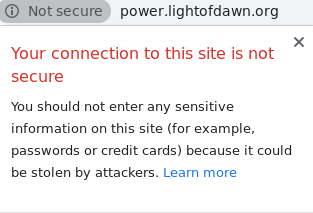
So today, an SSL certificate was acquired. You can now connect with HTTPS! (press link at top of page)*
(You can still connect with HTTP if you want)
Mr. Bot and mentioning system updated! (4th of April 2021 - Easter Sunday)
Mr Bot. has had some changes in his system. Please refer to the FAQ for changes in command syntax.
The mentioning system has long been buggy, and has had severe limitations, like requiring you to place a space after the mentioned user. However, today, that system has been replaced by some RegEx magic, which allows for an unlimited number of mentions in one message as well as not needing to place any special character after the username!
A bug which prevented pluses, ampersands and more from being uploaded was fixed! (28th of March 2021)
FAQ edited to include instructions for mobile users! (27th of March 2021)
DM's and multiple channel's coming soon! (4th of March 2021)
Login/logout and homepage edited! (11th of March 2021)
All content (including those linked, unless they point to other domains) is ©POWER! Inc, Abel Budiono, 2020 - 2021. All Rights reserved